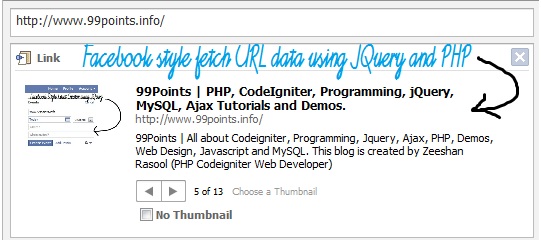
You have seen in Facebook, that how we give a url and it extract data such as images, title and description. Here now you can get this amazing script at 99Points. You have seen amazing and popular facebook style tutorials which can help you to get some amazing effects on your websites. I have created this awesome tutorial which is 99% same as facebook style. Check the demo and download the source code.
Download Script: https://www.box.com/shared/8z35cz0hrn
JQuery Code
Kod:
// <![CDATA[
$(document).ready(function(){
// delete event
$('#attach').livequery("click", function(){
if(!isValidURL($('#url').val()))
{
alert('Please enter a valid url.');
return false;
}
else
{
$('#load').show();
$.post("fetch.php?url="+$('#url').val(), {
}, function(response){
$('#loader').html($(response).fadeIn('slow'));
$('.images img').hide();
$('#load').hide();
$('img#1').fadeIn();
$('#cur_image').val(1);
});
}
});
// next image
$('#next').livequery("click", function(){
var firstimage = $('#cur_image').val();
$('#cur_image').val(1);
$('img#'+firstimage).hide();
if(firstimage <= $('#total_images').val())
{
firstimage = parseInt(firstimage)+parseInt(1);
$('#cur_image').val(firstimage);
$('img#'+firstimage).show();
}
});
// prev image
$('#prev').livequery("click", function(){
var firstimage = $('#cur_image').val();
$('img#'+firstimage).hide();
if(firstimage>0)
{
firstimage = parseInt(firstimage)-parseInt(1);
$('#cur_image').val(firstimage);
$('img#'+firstimage).show();
}
});
// watermark input fields
jQuery(function($){
$("#url").Watermark("http://");
});
jQuery(function($){
$("#url").Watermark("watermark","#369");
});
function UseData(){
$.Watermark.HideAll();
$.Watermark.ShowAll();
}
});
function isValidURL(url){
var RegExp = /(ftp|http|https):\/\/(\w+:{0,1}\w*@)?(\S+)(:[0-9]+)?(\/|\/([\w#!:.?+=&%@!\-\/]))?/;
if(RegExp.test(url)){
return true;
}else{
return false;
}
}
// ]]>
$(document).ready(function(){
// delete event
$('#attach').livequery("click", function(){
if(!isValidURL($('#url').val()))
{
alert('Please enter a valid url.');
return false;
}
else
{
$('#load').show();
$.post("fetch.php?url="+$('#url').val(), {
}, function(response){
$('#loader').html($(response).fadeIn('slow'));
$('.images img').hide();
$('#load').hide();
$('img#1').fadeIn();
$('#cur_image').val(1);
});
}
});
// next image
$('#next').livequery("click", function(){
var firstimage = $('#cur_image').val();
$('#cur_image').val(1);
$('img#'+firstimage).hide();
if(firstimage <= $('#total_images').val())
{
firstimage = parseInt(firstimage)+parseInt(1);
$('#cur_image').val(firstimage);
$('img#'+firstimage).show();
}
});
// prev image
$('#prev').livequery("click", function(){
var firstimage = $('#cur_image').val();
$('img#'+firstimage).hide();
if(firstimage>0)
{
firstimage = parseInt(firstimage)-parseInt(1);
$('#cur_image').val(firstimage);
$('img#'+firstimage).show();
}
});
// watermark input fields
jQuery(function($){
$("#url").Watermark("http://");
});
jQuery(function($){
$("#url").Watermark("watermark","#369");
});
function UseData(){
$.Watermark.HideAll();
$.Watermark.ShowAll();
}
});
function isValidURL(url){
var RegExp = /(ftp|http|https):\/\/(\w+:{0,1}\w*@)?(\S+)(:[0-9]+)?(\/|\/([\w#!:.?+=&%@!\-\/]))?/;
if(RegExp.test(url)){
return true;
}else{
return false;
}
}
// ]]>
index.php
:
hp]<input type="hidden" name="cur_image" id="cur_image" />
<div class="wrap" align="center">
<div class="box" align="left">
<div class="head">Link</div>
<div class="close" align="right">
<div class="closes"></div>
</div>
<br clear="all" /><br clear="all" />
<input type="text" name="url" size="64" id="url" />
<input type="button" name="attach" value="Attach" id="attach" />
<br clear="all" />
<div id="loader">
<div align="center" id="load" style="display ne"><img src="load.gif" /></div>
</div>
<br clear="all" />
</div>
</div>
<div class="wrap" align="center">
<div class="box" align="left">
<div class="head">Link</div>
<div class="close" align="right">
<div class="closes"></div>
</div>
<br clear="all" /><br clear="all" />
<input type="text" name="url" size="64" id="url" />
<input type="button" name="attach" value="Attach" id="attach" />
<br clear="all" />
<div id="loader">
<div align="center" id="load" style="display
ne"><img src="load.gif" /></div></div>
<br clear="all" />
</div>
</div>
fetch.php
I have get images and title using fopen method of php but for description I used get_meta_tags() function which returns meta tags of url. After getting all images I just put a loop and get all images which size is greater than 100px so that small images should not be included. I have created this tutorial separate from our facebook style wall posting and comment application and facebook profile edit. However if you want to add this functionality in that script just download all files and add your code.
:
hp]<?php
$url = $_REQUEST['url'];
$url = checkValues($url);
function checkValues($value)
{
$value = trim($value);
if (get_magic_quotes_gpc())
{
$value = stripslashes($value);
}
$value = strtr($value, array_flip(get_html_translation_table(HTML_ENTITIES)));
$value = strip_tags($value);
$value = htmlspecialchars($value);
return $value;
}
function fetch_record($path)
{
$file = fopen($path, "r");
if (!$file)
{
exit("Problem occured");
}
$data = '';
while (!feof($file))
{
$data .= fgets($file, 1024);
}
return $data;
}
$string = fetch_record($url);
/// fecth title
$title_regex = "/<title>(.+)<\/title>/i";
preg_match_all($title_regex, $string, $title, PREG_PATTERN_ORDER);
$url_title = $title[1];
/// fecth decription
$tags = get_meta_tags($url);
// fetch images
$image_regex = '/<img[^>]*'.'src=[\"|\'](.*)[\"|\']/Ui';
preg_match_all($image_regex, $string, $img, PREG_PATTERN_ORDER);
$images_array = $img[1];
?>
<div class="images">
<?php
$k=1;
for ($i=0;$i<=sizeof($images_array);$i++)
{
if(@$images_array[$i])
{
if(@getimagesize(@$images_array[$i]))
{
list($width, $height, $type, $attr) = getimagesize(@$images_array[$i]);
if($width >= 50 && $height >= 50 ){
echo "<img src='".@$images_array[$i]."' width='100' id='".$k."' >";
$k++;
}
}
}
}
?>
<!--<img src="ajax.jpg" alt="" />-->
<input type="hidden" name="total_images" id="total_images" value="<?php echo --$k?>" />
</div>
<div class="info">
<label class="title">
<?php echo @$url_title[0]; ?>
</label>
<br clear="all" />
<label class="url">
<?php echo substr($url ,0,35); ?>
</label>
<br clear="all" /><br clear="all" />
<label class="desc">
<?php echo @$tags['description']; ?>
</label>
<br clear="all" /><br clear="all" />
<label style="float:left"><img src="prev.png" id="prev" alt="" /><img src="next.png" id="next" alt="" /></label>
<label class="totalimg">
Total <?php echo $k?> images
</label>
<br clear="all" />
</div>
$url = $_REQUEST['url'];
$url = checkValues($url);
function checkValues($value)
{
$value = trim($value);
if (get_magic_quotes_gpc())
{
$value = stripslashes($value);
}
$value = strtr($value, array_flip(get_html_translation_table(HTML_ENTITIES)));
$value = strip_tags($value);
$value = htmlspecialchars($value);
return $value;
}
function fetch_record($path)
{
$file = fopen($path, "r");
if (!$file)
{
exit("Problem occured");
}
$data = '';
while (!feof($file))
{
$data .= fgets($file, 1024);
}
return $data;
}
$string = fetch_record($url);
/// fecth title
$title_regex = "/<title>(.+)<\/title>/i";
preg_match_all($title_regex, $string, $title, PREG_PATTERN_ORDER);
$url_title = $title[1];
/// fecth decription
$tags = get_meta_tags($url);
// fetch images
$image_regex = '/<img[^>]*'.'src=[\"|\'](.*)[\"|\']/Ui';
preg_match_all($image_regex, $string, $img, PREG_PATTERN_ORDER);
$images_array = $img[1];
?>
<div class="images">
<?php
$k=1;
for ($i=0;$i<=sizeof($images_array);$i++)
{
if(@$images_array[$i])
{
if(@getimagesize(@$images_array[$i]))
{
list($width, $height, $type, $attr) = getimagesize(@$images_array[$i]);
if($width >= 50 && $height >= 50 ){
echo "<img src='".@$images_array[$i]."' width='100' id='".$k."' >";
$k++;
}
}
}
}
?>
<!--<img src="ajax.jpg" alt="" />-->
<input type="hidden" name="total_images" id="total_images" value="<?php echo --$k?>" />
</div>
<div class="info">
<label class="title">
<?php echo @$url_title[0]; ?>
</label>
<br clear="all" />
<label class="url">
<?php echo substr($url ,0,35); ?>
</label>
<br clear="all" /><br clear="all" />
<label class="desc">
<?php echo @$tags['description']; ?>
</label>
<br clear="all" /><br clear="all" />
<label style="float:left"><img src="prev.png" id="prev" alt="" /><img src="next.png" id="next" alt="" /></label>
<label class="totalimg">
Total <?php echo $k?> images
</label>
<br clear="all" />
</div>