Shop Plugin
The shop is an upgrade from a previous released plugin - forumshop. The previous shop had many errors and vulnerabilities which have all been fixed in this release.
How to install
Read attached install guide for in-depth installation
Preview

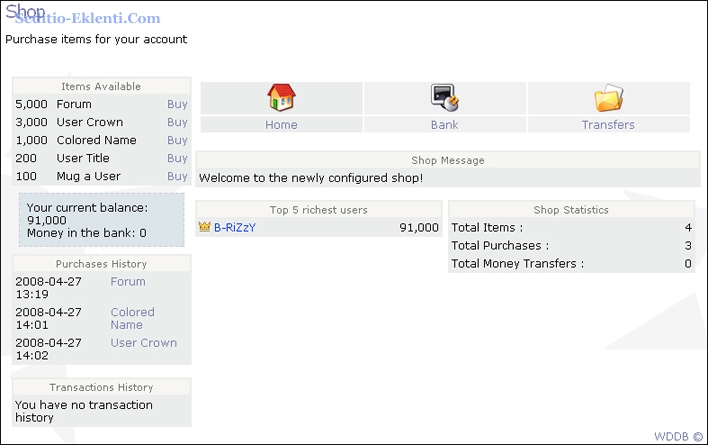 What is the shopş
The shop is an upgrade from a previous released plugin - forumshop. The previous shop had many errors and vulnerabilities which have all been fixed in this release.
Features
1 : Post-Points system - if the user adds a page, posts a topic, replies to a topic, posts a comment, or rates a page they will earn money which they will be able to spend in the shop. (this feature is built in, no other requirements)
2 : Re-count system for points
3 : Flexible for experienced coders
4 : Logs all purchases/transactions
5 : Supports multiple languages
Disclaimer
This plugin is free for both commercial and personal use as long as all copyrights are left intact. If you have any problems, post on our forums for support. We will help you with any problem that we can. We are not responsible for what you do to/with this plugin, and can not be held reliable for anything that happens.
Release History
Version 1.0
--------------
First Stable Release
Version 1.1
--------------
1 : Money deposited in the bank now gains 6% interest every 24 hours
2 : New transfer funds options in administration panel (give your users money)
3 : New item: Mug a User - you can now steal money from other users
4 : A little bit of cleaning
Version 1.2
--------------
1 : Reconstructed administration panel
2 : Added a reset all currency option
3 : Added a transfer-log
4 : Added a auto-installer/updater
5 : Added a transfer limit and time limit
6 : Added a bank limit and time limit
Version 1.3 (current)
--------------
1 : disable/enable time limits for bank/transfer
2 : disable/enable money limit for bank/transfer
3 : disable/enable certain items
4 : disable/enable certain methods of gaining money
How to installş
Installing the shop takes a little bit of core hacking. Nothing too major, or too hard to do. There are only about 4 of them, but make sure to make a backup just in case.
Part 1 : Uploading the plugin
--------------------
1 : Download and extract the page
2 : Upload the plugin into the plugins directory
3 : Go into the administration panel, then tab "Plugins", click Shop, and at bottom of the plugin properties, select "Install all"
4 : You can change the configuration settings to meet your specifications
5 : Once the plugin is installed and configured, click on the tools tab, and at the bottom of the page it will say "Upgrade Shop Versions" choose whichever applies to you and click update!
Part 2 : Core hacks
--------------------
1. /system/common.php find
Kod:
if ($row['user_maingrp']>3)
{
$usr['id'] = $row['user_id'];
BELOW, ADD:
Kod:
$usr['money'] = $row['money'];
$usr['moneybanked'] = getcashbanked($row['user_id']);
$usr['moneybanked_format'] = number_format(getcashbanked($row['user_id']));
$usr['money_format'] = number_format($row['money']);
2. /system/functions.php Find
Kod:
$cfg['sqldb'] = 'mysql';
BELOW, ADD:
Kod:
function getcashbanked($userid)
{
$sql2 = sed_sql_query("SELECT COUNT(*) FROM sed_shop_bank WHERE userid='$userid'");
$amtbnk = sed_sql_result($sql2, 0, "COUNT(*)");
if($amtbnk > 0)
{
$sql3 = mysql_query("SELECT * FROM sed_shop_bank WHERE userid='$userid' LIMIT 1");
$row3 = mysql_fetch_array($sql3);
return $row3['amount'];
}else{
return 0;
}
}
3. /system/functions.php Find
Kod:
function sed_build_user($id, $user)
REPLACE FUNCTION WITH:
Kod:
function sed_build_user($id, $user)
{
global $cfg;
$sqlcrown = sed_sql_query("SELECT COUNT(*) FROM sed_shop_buy WHERE userid='$id' AND itemid=1");
$precrown = sed_sql_result($sqlcrown,0,'COUNT(*)');
$sqlcolor = sed_sql_query("SELECT COUNT(*) FROM sed_shop_buy WHERE userid='$id' AND itemid=2");
$precolor = sed_sql_result($sqlcolor,0,'COUNT(*)');
if($precrown>0)
{
$sql = mysql_query("SELECT * FROM sed_shop_buy WHERE userid='$id' AND itemid=1");
$row = mysql_fetch_array($sql);
$crown = "<img src='plugins/shop/crowns/".$row['extra3'].".gif'>";
}
if($precolor>0)
{
$sql = mysql_query("SELECT * FROM sed_shop_buy WHERE userid='$id' AND itemid=2");
$row = mysql_fetch_array($sql);
$color = "".$row['extra3']."";
}
if (($id==0 && !empty($user)))
{ $result = $user; }
elseif ($id==0)
{ $result = ''; }
else
{ $result = (!empty($user)) ş "".$crown." <a style='color:".$color."' href=\"users.phpşm=details&id=".$id."\">".$user."</a>" : 'ş'; }
return($result);
}
de]
4. /system/functions.php Find
Kod:
$ind = sed_import('ind','G','INT');
BELOW, ADD:
Kod:
/* == Hook for the plugins == */
$extp = sed_getextplugins('comments.first');
if (is_array($extp))
{ foreach($extp as $k => $pl) { include('plugins/'.$pl['pl_code'].'/'.$pl['pl_file'].'.php'); } }
/* ===== */
Upgrade from 1.1 => 1.2
With the new automatic upgrade tool featured in the administration panel, it makes upgrading the shop even easier! To upgrade from version 1.1 => 1.2 all you have to do is visit the administration panel, click on the tools option, click on Shop, then where it says Upgrade shop versions click on the one that applies to you.
How it works
Once this plugin is installed, you're pretty much good to go. Although, you must read and understand this completely:
When a user creates a forum it will be stored into your database as a locked forum, with no category. It will send a private message to all users with the main group of 5 (administrator) saying that this forum needs validation. To validate a forum you must first go to you administration panel and click on the forums tab. From there, click on the created forum and unlock it. Then, click on the forums rights and click update. Now the forum is 100% active, however you must make the user who submitted the forum a moderator. To do that, create a new user group, and select the box that says 'hidden'. Then set that group rights to the created forum. Once the rights are set then you have to update the user who submitted the forum and add him to the group that you set the moderation rights to (do not make it the main group, just add him to the group).


 1.
1.


